
Get started
Setup takes about 15 minutes. I’ll walk through it with you the first time, so if anything here doesn’t match what you see, email prestonbrown835@gmail.com.
You’ll need
- A Windows 10 or 11 PC, or a Mac with macOS 13 or later
- Google Chrome or Microsoft Edge
- A password manager, or somewhere safe to write down a key
- Your company’s OK, if its policy requires approval for software that handles borrower information
Download LoanRelay
I send the installer directly for now. Email prestonbrown835@gmail.com with the computer you picked above.
Which Mac do I have?
Open the Apple menu and choose About This Mac. If it lists a Chip, such as Apple M1 or M3, you have Apple silicon. If it lists a Processor with “Intel” in the name, you have Intel.
My work computer won’t let me install it
Ask your IT team. You can forward them this:
LoanRelay is a desktop app for loan processors. It compares Closing Disclosure fees with the fees in our LOS and, through a Chrome or Edge extension, fills in the corrections the processor approves. It never saves or submits LOS pages itself.
It installs for one user. Loan data stays on the computer in an encrypted database whose key is held by the operating system’s keychain; nothing is sent to the developer or any server. The installers are not code-signed yet.
Terms, privacy policy, and security questions: Preston Brown, prestonbrown835@gmail.com.
Install it
- Open the installer. It sets up LoanRelay for your user and opens it when done.
- After that, open LoanRelay from the Start menu or the desktop shortcut.
- Open the downloaded file and drag LoanRelay into Applications.
- Open LoanRelay from your Applications folder.
The first time it opens, LoanRelay asks you to accept the Terms of Service and Acceptable Use Policy.
The installers aren’t code-signed yet, so Windows and macOS will say they can’t verify the app. Only open an installer you got from me directly.
What the warning looks like
Windows shows “Windows protected your PC.” Click More info, then Run anyway. You only see this once.
macOS says it can’t check the app for malicious software. Click Done, open System Settings → Privacy & Security, scroll to the message about LoanRelay, click Open Anyway, and confirm with your password or Touch ID. You only see this once.
Save your recovery key
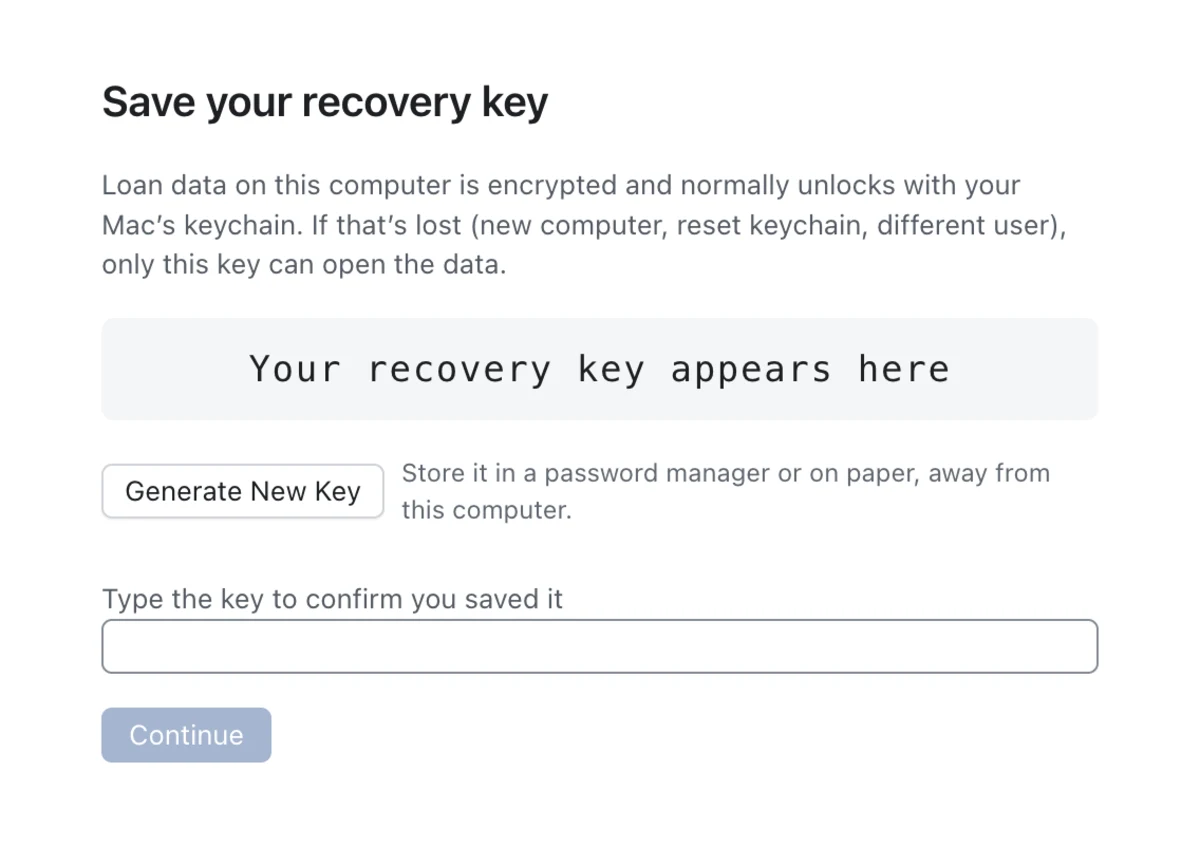
- LoanRelay shows a recovery key. Put it in your password manager or write it down.
- Type it back in and click Continue.
Your loan data is encrypted and normally unlocks with your computer sign-in. If that ever stops working, on a new computer or after a keychain reset, the recovery key is the only way back in. I don’t have a copy and can’t reset it.
Add the browser extension
The extension reads and fills your LOS pages in Chrome or Edge. It talks only to LoanRelay on your computer.
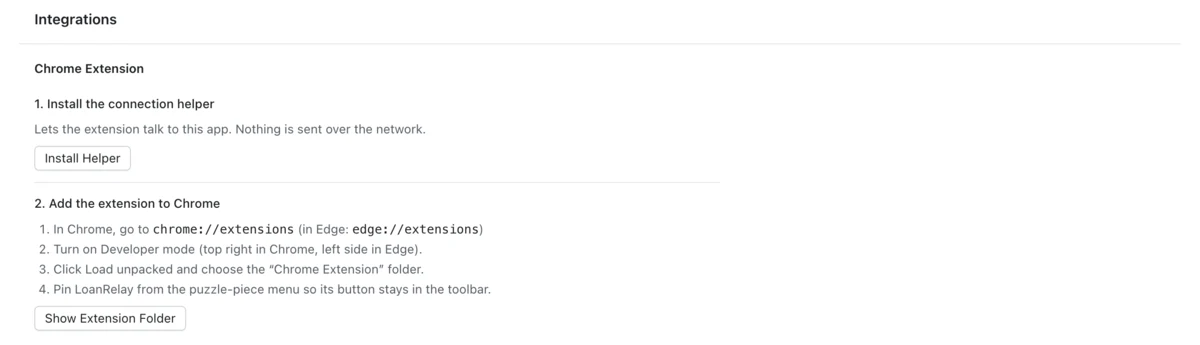
- In LoanRelay, open Integrations. Under Chrome Extension, click Install Helper, then Show Extension Folder.
- In Chrome, go to chrome://extensions (in Edge, edge://extensions) and turn on Developer mode.
- Click Load unpacked and choose the Chrome Extension folder LoanRelay showed you.
- Pin LoanRelay from the puzzle-piece menu in the browser toolbar.
- Open your LOS, click the LoanRelay button, and click Allow LoanRelay for your LOS site. It works only on sites you allow.
Until LoanRelay is in the Chrome Web Store, the extension is installed from a folder. If the Developer mode switch is missing or grayed out, your company manages the browser and IT will need to allow it.
The extension says it can’t reach LoanRelay
Make sure LoanRelay is open and unlocked. If it still can’t connect, open Integrations, click Reinstall Helper, and reload the extension on your browser’s extensions page.
Check your first loan
To look around first, click Load Sample Loans on the empty Loans screen. It adds four made-up loans with fee differences, a changed closing date, conditions, and follow-ups, so you can try Open Items before adding your own.
- Click New Loan and enter the loan’s name and its loan number in your LOS.
- On Documents, click Import PDF… and choose the Closing Disclosure.
- Bring in the LOS fees. Either click Import LOS Fees… on Review and choose a fee export from your LOS, or open the loan in your LOS and click Send LOS Fees to App in the extension. LoanRelay compares the fees as soon as it has both.
- Go through Fees to decide. For each fee the LOS has wrong, click Update LOS to $….
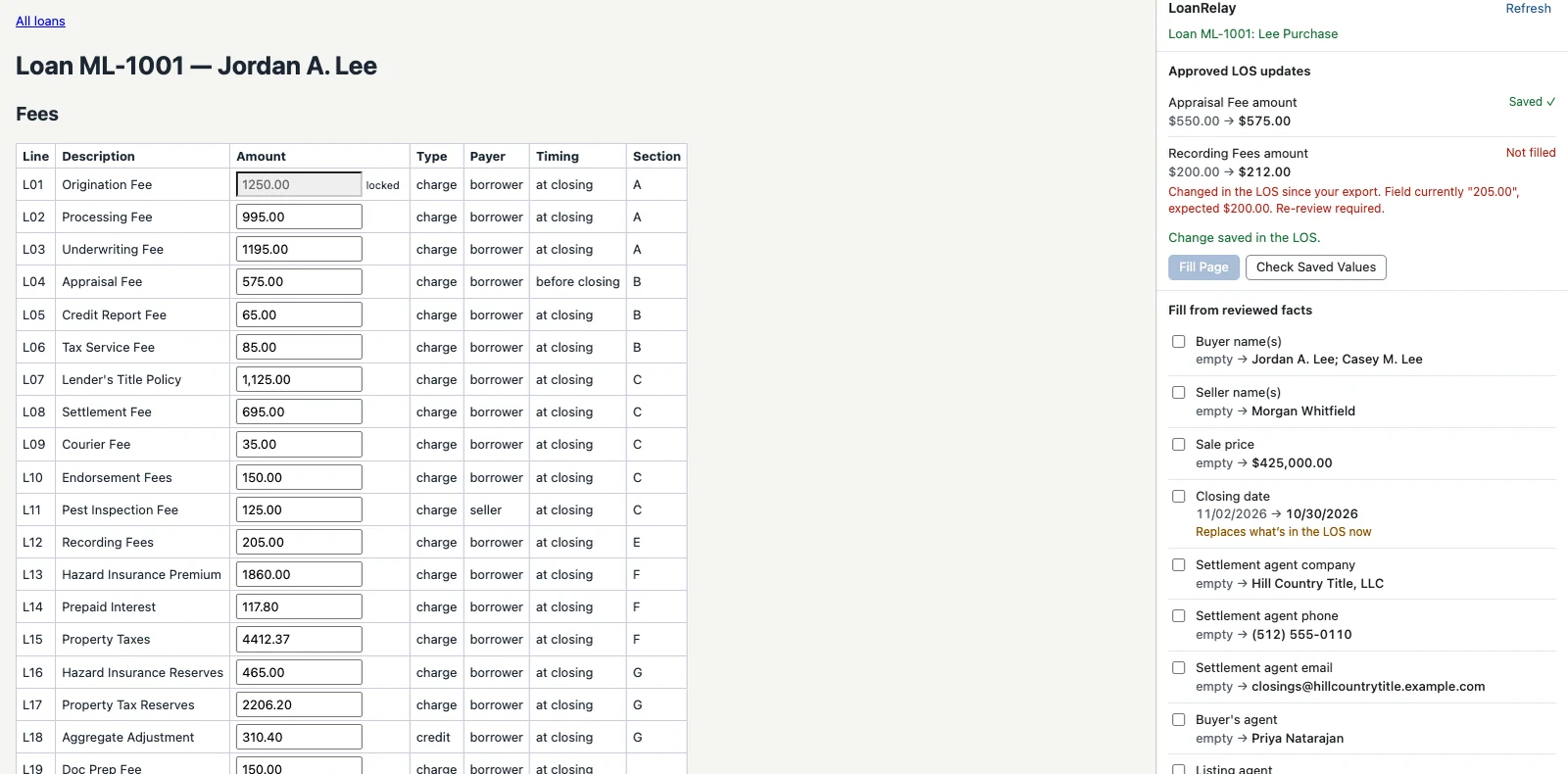
- Open the loan in your LOS and click the LoanRelay button in the toolbar. Click Fill Page, check the page, save it in the LOS, then click Check Saved Values.
The first time the extension sees one of your LOS screens, it may say the page isn’t set up yet. Click Set Up This Page and confirm where each field is. It’s a one-time step per screen, and we can do it together.
Questions or problems
Email prestonbrown835@gmail.com. Please don’t attach loan documents or anything with borrower information.
Troubleshooting
The extension panel doesn’t show the loan
Open the loan’s page in your LOS, then click Refresh in the panel. If it says no loan has that LOS loan number, make sure the loan number in LoanRelay matches the one in your LOS exactly.
A field says “Changed in the LOS since your export”
Someone changed that value in the LOS after you compared, so LoanRelay didn’t fill it. Bring in the LOS fees again, compare, and approve again.
The installer or extension is blocked on a work computer
Company policies can block new apps, unsigned installers, or extensions installed from a folder. Only your IT team can change that. Step 1 has a note you can forward to them.
LoanRelay asks for the recovery key
Your computer sign-in couldn’t unlock your data. Enter the recovery key and LoanRelay links it again. Without the key, the data can’t be opened by anyone.
Removing LoanRelay and its data
Windows: Settings → Apps → Installed apps → LoanRelay → Uninstall.
Mac: quit LoanRelay and drag it from Applications to the Trash.
Uninstalling doesn’t delete your loan data. To remove it, delete the LoanRelay folder in %APPDATA% on Windows or in ~/Library/Application Support on a Mac, following your company’s rules for keeping loan records. Then remove the extension from your browser’s extensions page.
Two small items hold no loan data and can stay, or you can remove them too: the browser helper’s registration (com.loanrelay.host, in the browser’s NativeMessagingHosts folder on a Mac, or under HKEY_CURRENT_USER\Software\Google\Chrome\NativeMessagingHostson Windows), and on a Mac the LoanRelay Safe Storage item in Keychain Access.